Jatayu AI effect guide
Last updated:
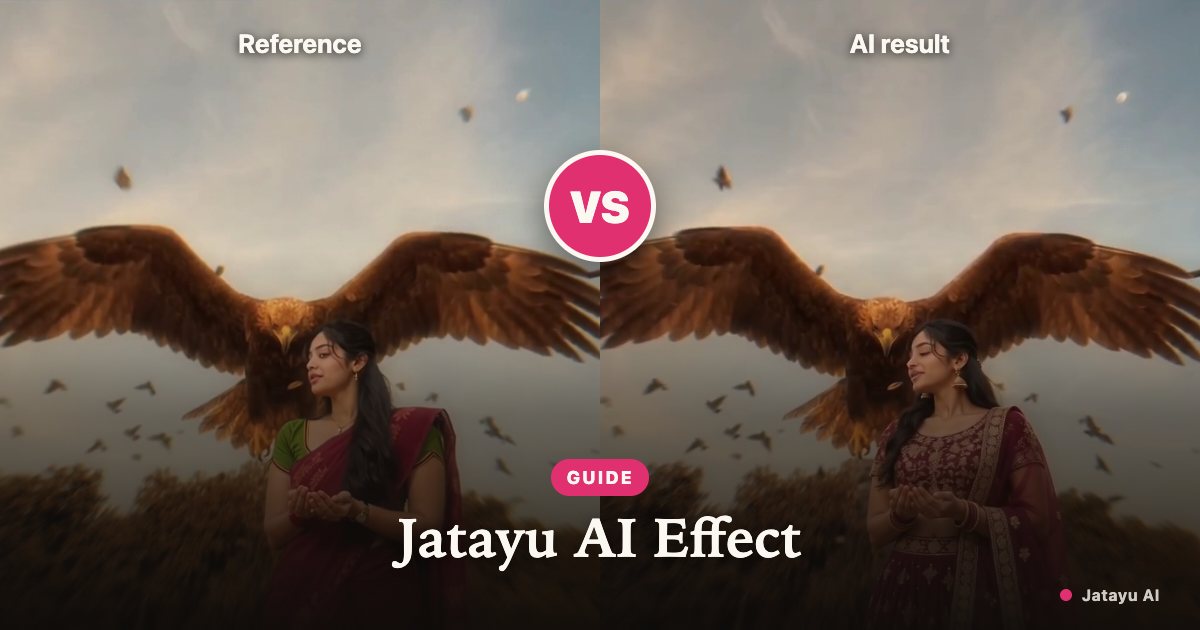
A Jatayu edit places a person and a legendary giant bird in the same cinematic scene. This guide explains the visual idea, how a template-based workflow differs from a general video generator, and what to inspect in a finished clip. The site shows an authorized source clip, reference portrait and one accepted Seedance 2.0 Mini result.
The scene is built around scale, not choreography
The striking part of this effect is the relationship between an ordinary person and an enormous feathered bird. A shoulder, a wing and the horizon need to read at different depths. Lighting and perspective connect them. The person can remain relatively still while the surrounding scene provides the sense of an encounter. This is why a clear portrait and room around the subject matter more than a dramatic pose.
The effect takes its name from the legendary figure Jatayu. Interpretations of that figure vary. This project uses a fictional cinematic composition and does not claim to reproduce an authoritative depiction, a film scene or footage of a real event. There is no need to invent an origin story or a first creator to explain how this particular photo-to-video workflow operates.
What people mean by a cinematic eagle video
Search phrases such as cinematic eagle video and giant-bird edit describe a visual impression rather than a technical model specification. A large bird behind a person, wings occupying the upper frame and a distant landscape are common compositional ideas. They do not imply that every generator accepts the same inputs, uses the same model or produces the same result.
When comparing tools, look at what is actually being offered. Is it an existing scene with a new person, a still image animated into a clip, or a freely written text prompt? A product name alone cannot answer that question. It is also useful to distinguish a concept illustration from a real generated sample, especially when deciding whether a paid render is worth trying.
How Jatayu photo to video works here
Jatayu AI is designed around a prepared scene. You supply one adult portrait for the current 7-second scene. The reference scene supplies framing and motion guidance; the portrait supplies the subject. The current workflow sends the portrait and scene reference together to generate the video in one step. You do not need to write a prompt or prepare a composite image.
Reference guidance is not a promise of exact replication. A model may reinterpret a face, a garment, a feather or a camera movement. A complicated wing passing behind an arm can expose errors that are invisible in a still image. One reference test has been accepted. Results across different portraits and compositions still need broader testing.
Choose a portrait with useful information
Use one consenting adult, facing the camera, with the face large enough to see clearly. Even daylight is a practical starting point. Keep the hairline, chin and shoulders in frame. A busy background is less useful than a clear outline, and a strong beauty filter can remove the very details that help the model distinguish the person.
Avoid photographs with multiple faces, heavy blur, sunglasses or an object covering the mouth. Those inputs leave more for the model to guess. A wider upper-body crop can help a scene that needs shoulder placement, but do not assume it guarantees a full-body likeness. If a preview looks wrong, change the input composition before paying for another uncertain result.
Give the bird and the person separate space
The bird should remain a separate subject behind or beside the person. That distinction matters because overlapping shapes can turn into unwanted wings on a person, merged limbs or strange feather textures. A scene with a clear gap around the head and shoulder line is easier to inspect than a composition where every important shape crosses the face.
Keep the horizon and the apparent light direction coherent. A brightly lit face against a dark backlit landscape can look pasted in even when the face itself is recognisable. A prepared template can provide a consistent starting composition, but the final result still needs review. No image-upload service can infer every missing detail of a complex scene from a close-cropped selfie.
Inspect motion across the full clip
The current scene is 7 seconds. Review whether the portrait suits this scene before making another request. Watch the whole result rather than judging only the first frame. Look for a face that shifts between identities, fingers that merge, or a wing that changes shape as it crosses the background.
Also check whether the camera motion is comfortable in the landscape frame. A fast move can push the person out of view or cut through the bird. There is no fixed completion-time promise: processing depends on the provider, queue and clip length.
Understand credits before requesting a render
The generator shows the selected length and credit cost before submission. Each 7-second video has a fixed cost of 10 credits. The pricing page lists credit packs and any enabled subscriptions. Pack credits do not expire; subscription allowances have their own monthly expiry. Read the selected product rather than treating every balance as the same kind of purchase.
A task that fails returns its deducted credits automatically. A completed AI render can still contain visual errors, so automatic failure refunds should not be confused with a guarantee that every completed image will match your taste. For billing questions, include the order or video identifier when contacting support. Do not send a payment card number or account password.
Respect the portrait and the cultural subject
Use your own photo or obtain permission from the adult shown in it. This site does not accept minors, public figures or pets as portrait subjects. Permission to use a photo is separate from permission to copy someone else’s video, music or artwork. A clip found on social media is not automatically an asset you can reuse commercially.
Treat the legendary subject with care when writing captions and choosing a scene. Do not present an invented clip as documentary footage or an official adaptation. This is an independent creative project, without an affiliation to a studio, social platform or original trend creator. If an image or generated clip affects someone’s rights, the site provides a reporting route.
Share an AI clip with clear context
Download the finished MP4 and review it before posting. Keep the AI label and identify the clip as generated in the caption. The video is a fictional composition, even if the uploaded portrait is real. The site includes no licensed soundtrack; add music only when you have the necessary permission and the destination platform allows that use.
Save a local copy before its storage period ends. Uploads are deleted automatically 7 days after upload, and finished videos are kept for 30 days after they finish. A public share link is optional and should be enabled only when you want other people to watch the clip. If you publish it elsewhere, removing it from this site will not automatically remove copies you posted to another platform.
A practical checklist for your first Jatayu edit
Prepare a clear adult portrait, read the sample captions and check the 7-second scene. Confirm consent, check the credit cost and submit only when you understand the preview status. When the result arrives, inspect the face, shoulder line, hands, bird outline and background across the entire clip. Keep only a result you are comfortable labelling and sharing.
For the upload, sign-in and download steps, use the accompanying photo-to-video tutorial. If your goal is a freely directed story with several characters, a talking avatar or an exact recreation of a film shot, this prepared-scene workflow does not establish support for those features. A focused first attempt is easier to judge than a long clip with several untested expectations.
Your Jatayu moment is one photo away
Create my video